
Accountable teams connect your canvas structure to execution on team boards. Set a team on a parent card and children inherit it until you override on a lower card. Only leaf cards become board rows.
Assign and inherit
Open a card and set Accountable Team in the Properties section of the card detail pane. When you leave the field empty on a new child card, it inherits the team from the nearest parent above (Achievement or Verification parent).
Inherited teams show with muted styling on the canvas. You cannot clear an inherited team without picking a different team explicitly. Changing the team on a card overrides inheritance for that card and flows down to descendants that were still inheriting.
Accountable team flows from parent to child and to linked verification cards. Override on any card to change the team for that card and everything below it.
Which cards appear on the board
The team board lists executable work at the leaves of the tree. A leaf card has no Achievement child goals underneath. Verification children do not block a parent from being a board row.
Leaf Achievement and Verification cards with an accountable team appear on that team board by default, usually in Backlog. Parent cards that still have achievement children underneath stay on the canvas only.
Leaf achievement and verification cards with an accountable team show on the team board. Turn off Show on team board when work is not ready, scope is still shifting, or you want a cleaner backlog.
Show on team board
Show on team board lives in the Properties section of the card detail pane for every card. On leaf cards (no Achievement children below), turn it off to hide the card from the board list while keeping it on the canvas. The card stays editable; it simply does not show as a row until you turn the switch back on.
On parent cards with achievement children underneath, the switch is shown but disabled. The board tracks child goals, not the parent as its own row. Cards with only Verification children to the side are still treated as leaves for this control.
Team label and board status on the canvas
At the bottom of each canvas card you see the accountable team name when a team is set (for example Dev). Hover the team name for a short tooltip: where the team comes from (assigned on this card or inherited from a parent), and whether you can open that team board from here.
When the card is on the team board (including Backlog), the tooltip includes Click to open the team board. Click the team name to jump to that board and scroll to the card.
Next to the team name, a board status chip shows the card column when it has left Backlog (for example Planned, Work in Progress, or Done). Cards still in Backlog do not show a status chip. Cards hidden from the team board do not show board status on the canvas until you turn Show on team board back on.
Fulfilled and Verified on parent cards
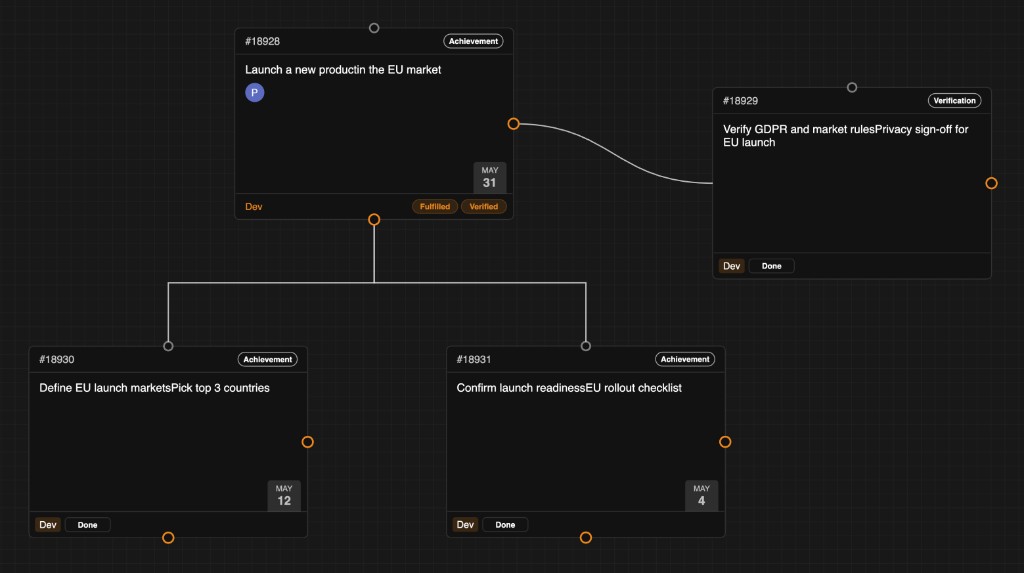
Parent #18928: Fulfilled when achievement children are Done; Verified when the verification child is Done.
Parent cards stay on the canvas while children execute on team boards. Yirar rolls up outcomes on the parent so you can see progress at a glance.
Achievement children. When every active Achievement child is resolved (typically Done on its team board), the parent shows a Fulfilled chip.
Verification children. When every active Verification child is resolved, the parent shows a Verified chip.
Both together. A parent can show Fulfilled and Verified at the same time when both groups are fully resolved. In the example above, the top goal shows both chips because achievement children #18930 and #18931 are Done and verification card #18929 is Done.
If a child moves out of Done or you add a new child, the parent chips update. Fulfilled and Verified are outcome labels on the map, not board columns.
When accountable team is locked
Yirar locks Accountable Team in the Properties pane when this card has left Backlog (or joined an iteration), or when any descendant has started work the same way. A child in Planned, Work in Progress, or a sprint means someone is already executing under the current team. Changing the team mid-flight would reassign responsibility without that team agreeing to take the work.
Why this matters. Boards and iterations assume a stable owner. If the accountable team could change while work is active, cards could land on the wrong board, WIP limits would lie, and it would be unclear who owns delivery.
How to change it again. Move the affected card and every descendant that has started back to Backlog, then update Accountable Team. That keeps handoffs deliberate: you reset commitment before assigning a different team.